# HD-2D Engine
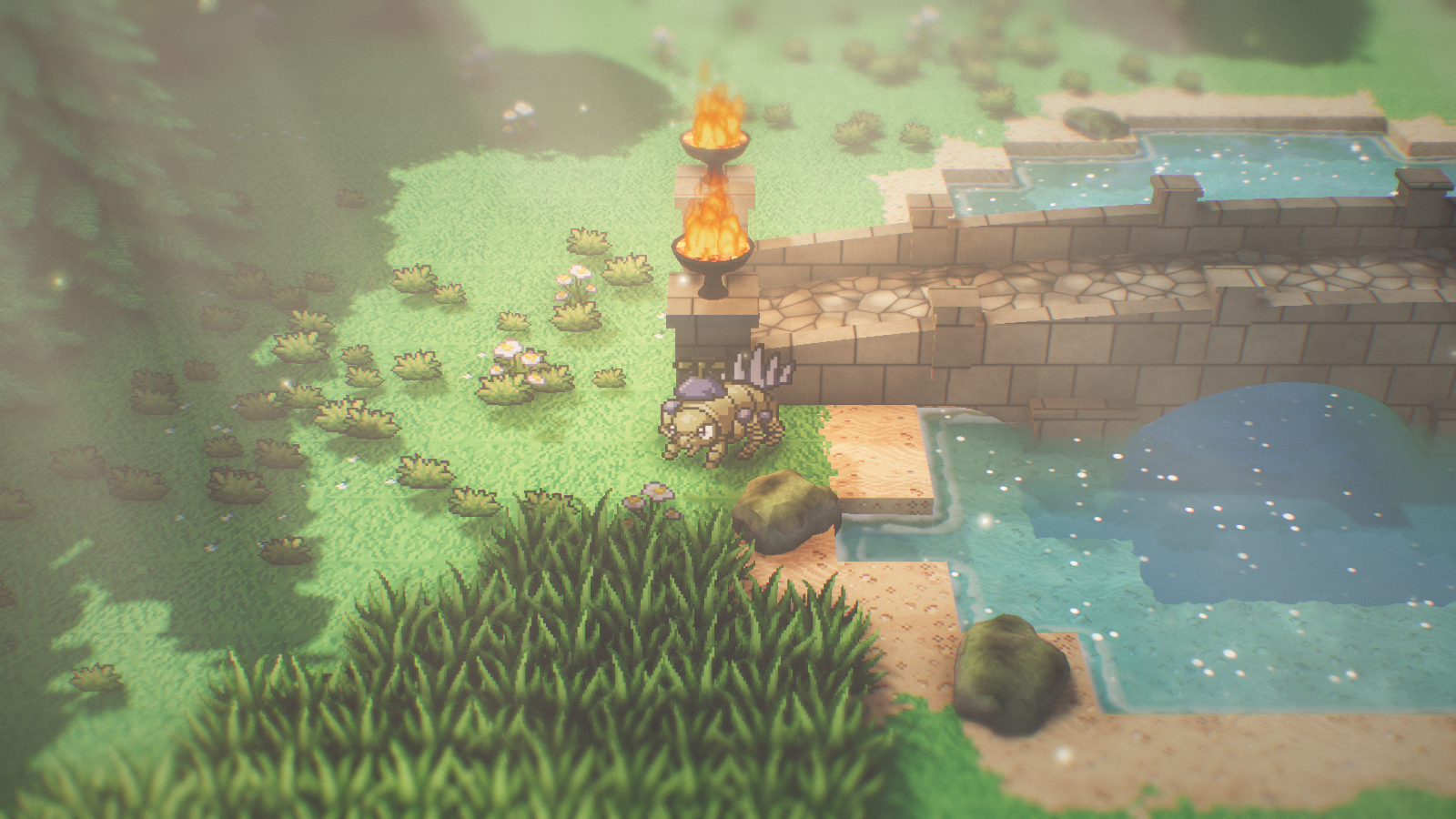
A small C++20 / OpenGL 4.5 engine that recreates the look of Square Enix's
**HD-2D** style (Octopath Traveler, Triangle Strategy, Live A Live, Dragon
Quest III HD-2D): a 3D diorama world where the ground is skinned in pixel art,
characters and small props (flowers, grass tufts, tall grass) are billboarded
pixel-art sprites, and scenery like trees, bushes and rocks are real **3D
models with higher-resolution painted textures**. Lighting, shadows, ambient
occlusion, fog, god rays, water, fire, rain and particles are all rendered as
high-resolution 3D effects.
## What makes HD-2D look like HD-2D
| Trait | How this engine does it |
| --- | --- |
| 3D world built from pixel-art textures | Tile-based terraced terrain (`Terrain`) with pixel-art material layers, organically jittered material borders at texel granularity, grass overhangs on cliffs, baked corner AO |
| Crisp pixels at any distance | "Sharp bilinear" sampling (`pixelart.glsl`): hard texel edges when magnified, antialiased + mipmapped when minified (no `GL_NEAREST` shimmer) |
| Upright 2D sprites in 3D | Characters and small props are camera-facing (Y-axis) billboards (`BillboardBatch`), planted by their lowest opaque pixel row (or a per-frame feet row); per instance: sprite-sheet / atlas sub-rect (`SpriteAtlas`, `Texture::cellUV`), flip, paper-turn yaw, dithered alpha fade and hit flash |
| 3D scenery with painted textures | Trees, bushes, rocks and the stone bridge are instanced glTF models (`ModelLibrary`, `ModelBatch`) built in Blender: leaf-card canopies with alpha-tested 1K leaf textures, rounded custom normals for soft stylized shading, sun translucency, wind sway from per-vertex weights, emissive materials (glowing coals) |
| Grounded objects | Two kinds of ambient occlusion: half-res SSAO (depth-reconstructed normals, depth-aware blur, multiplied into the opaque scene before water) and a baked **ground contact occlusion** map (`GroundOcclusion`) that puts a dark core at every trunk / bush / rock base plus a soft canopy shade, applied to terrain, sprites and models near the ground |
| Nothing hides the player | Tall scenery (tree canopies) between the camera and the player is dithered away around the sprite, only above the sprite's head; low props opt out per batch (`ModelBatch::occluderFade = false`, used for the bridge, rocks and bushes) |
| Sprites cast/receive real shadows | Shadow pass renders sprites as **sun-facing** cards so silhouettes are never edge-on; receivers sample their own sun-facing card to avoid self-shadowing |
| Miniature / diorama feel | Narrow FOV (~30°) high camera + strong depth-of-field with an extra tilt-shift band |
| Soft, warm, glowing light | HDR pipeline, Karis-averaged mip-chain bloom, ACES tonemap, lift/gain grading, vignette, subtle chromatic aberration and grain |
| Fog and god rays | Half-res ray-marched height fog; every step samples the sun shadow map and a sparse "canopy" beam pattern, giving physically shadowed light shafts; depth-aware upsample |
| Dappled forest light | Animated canopy cookie projected along the sun direction onto every surface |
| Beautiful water | Planar reflections, depth-aware refraction, per-channel absorption, analytic-derivative wave normals, shore distance field driving foam + ripples, strong HDR sun glints plus a field of twinkling point sparkles that bloom and depth of field turn into bokeh, caustics on the bottom |
| Living foliage | Instanced swaying grass with wind gusts; tall grass and bushes bend and rustle away from the player (vertex shader, Pokémon-style patches); leaf flutter scales with wind strength |
| High-res particles | Fireflies (also feed point lights) and dust motes that only glow inside sun shafts |
| Fire | Brazier fires (`ParticleSystem::addFire`): a compact, bowl-filling mass of nearly opaque, noise-eroded flame licks shaded per pixel from a hot yellow core through orange to red tips (drawn oldest-first so the core sits on top), turbulent embers, lit smoke puffs, a glow halo, and a flickering point light that also scatters into the fog |
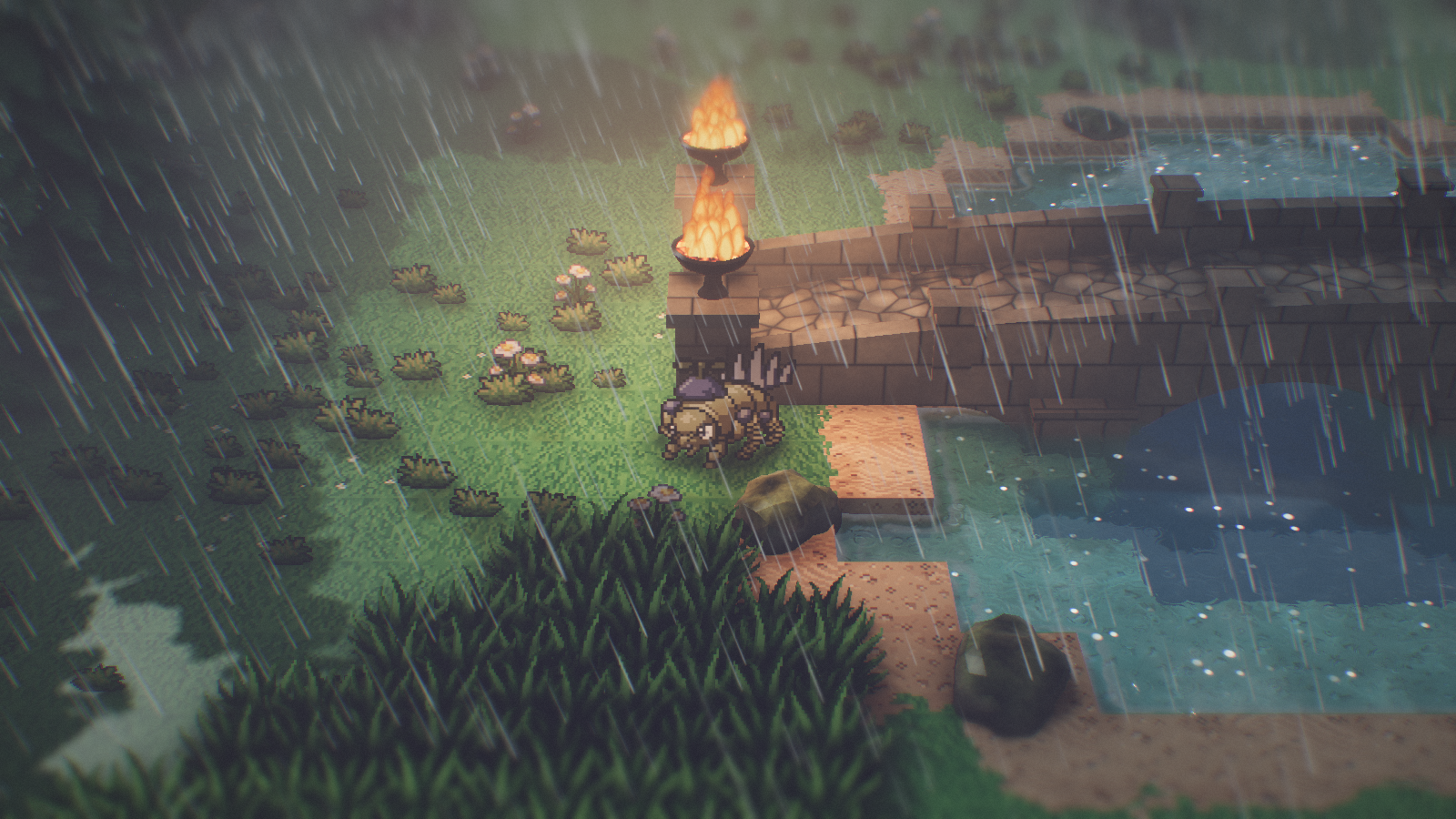
| Weather | `Weather` blends the clear look toward overcast (grey sky, weak sun, soft shadows), mist (thick low fog) and storm presets, each with its own 0..1 target and smooth transition: procedural world-space rain streaks (up to 18k, one draw call), ground splashes, raindrop ripple rings on the water, wet darker glossy surfaces, optional lightning flashes, ambient fireflies fade out |
| Time of day | `DayCycle` turns an hour into a complete look from tweakable keyframes (night, dawn, morning, noon, afternoon, dusk): sun arc by day, a dim cool moon as the shadow-casting light at night, deep blue nights with a twinkling star field and moon disc (also in water reflections), orange / purple dusks, brighter fireflies after dark; weather presets darken with it |
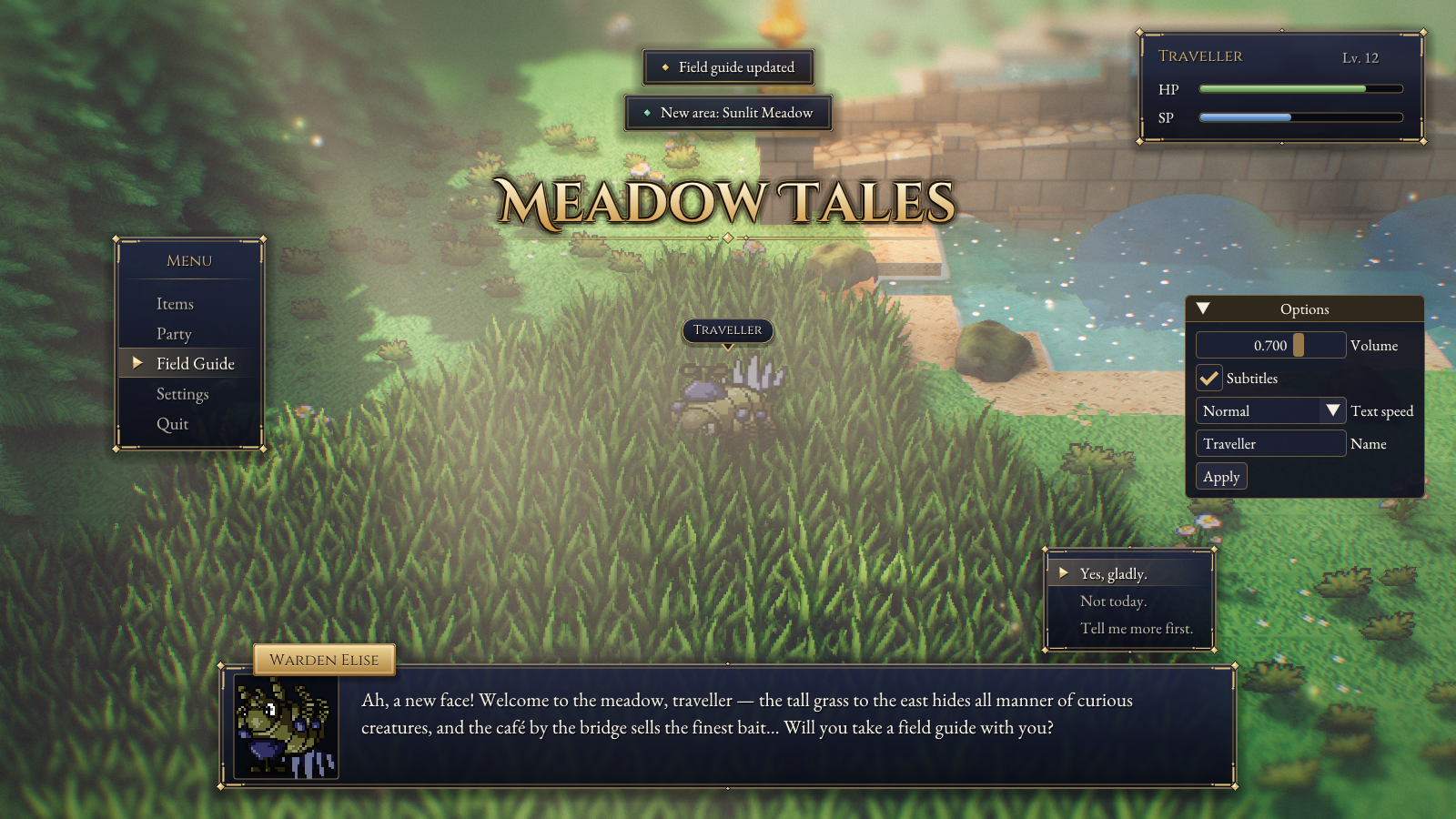
| Game UI | `hd2d::ui` (Octopath / Triangle Strategy look): translucent navy panels with a gold double border and corner gems, high-res serif text (Cinzel, EB Garamond) with a soft shadow, a typewriter dialogue box with gold name plate, portrait and choices, menus, name plates, toasts, progress bars and a matching Dear ImGui theme |
References: Unreal Engine's [Octopath Traveler spotlight](https://www.unrealengine.com/spotlights/octopath-traveler-s-hd-2d-art-style-and-story-make-for-a-jrpg-dream-come-true),
the [Octopath Traveler II interview](https://www.unrealengine.com/developer-interviews/octopath-traveler-ii-builds-a-bigger-bolder-world-in-its-stunning-hd-2d-style),
the Unreal Fest Europe 2019 talk ["The Fusion of Nostalgia and Novelty"](https://www.unrealengine.com/events/unreal-fest-europe-2019/the-fusion-of-nostalgia-and-novelty-in-the-development-of-octopath-traveler),
and [The Verge on HD-2D's evolution](https://www.theverge.com/entertainment/840080/square-enix-hd2d-games-octopath-dragon-quest).
## Building
Requirements: CMake ≥ 3.21, a C++20 compiler, OpenGL 4.5, `libepoxy`.
GLFW, GLM, stb and cgltf are used from the system when found and fetched
otherwise; Dear ImGui is fetched unless a parent project provides `imgui`.
```sh
# Arch / CachyOS
sudo pacman -S cmake ninja glfw glm libepoxy stb
cmake -S . -B build -G Ninja
ninja -C build
./build/hd2d_demo
```
The asset path is baked in at configure time (`HD2D_ASSET_DIR`), so the demo can
be run from any working directory.
To use the engine from another CMake project:
```cmake
add_subdirectory(path/to/Vibe-HD-2D hd2d) # HD2D_BUILD_DEMO defaults OFF here
target_link_libraries(my_game PRIVATE hd2d)
# Engine shaders: renderer.init(std::string(HD2D_ENGINE_ASSET_DIR) + "/shaders", ...)
```
`hd2d` publicly defines `HD2D_ENGINE_ASSET_DIR` (also a CMake cache variable)
pointing at the engine's `assets/`. The engine provides the `imgui` target
(Dear ImGui + GLFW/OpenGL3 backends) unless the parent defines one first;
`glfw` and `glm::glm` targets from the parent are reused too.
## Demo controls
| Input | Action |
| --- | --- |
| WASD / arrows | Move the sprite (camera-relative) |
| Q / E, right-drag | Rotate / orbit camera |
| Mouse wheel | Zoom |
| F1 | Toggle the tuning panels (sun, sky, AO, fog, god rays, water, DoF, bloom, grading, weather) |
| R | Toggle heavy rain (5 s transition) |
| O / G | Toggle overcast / morning mist |
| L | Toggle lightning (flashes while raining) |
| [ / ] | Time of day −/+ 1 hour (switches the demo to `DayCycle`) |
| F5 | Hot-reload shaders |
| F12 | Screenshot to `screenshots/` |
| T | Toggle the game UI showcase (Enter / Space advance the dialogue, Up / Down pick a choice) |
| Esc | Quit |
Scriptable captures (useful for look-dev and regression checks):
```sh
./build/hd2d_demo --screenshot out.png --frames 60 --pos 25,43.6 \
--sun -35,38 --yaw 20 --dist 12 --move 1,0 --rain 1 --set godRays=6 --set dof=0
```
Captures run hidden: `--screenshot` implies a hidden window (no toplevel is
ever created, so nothing pops up or takes focus) rendering into an offscreen
target, and all keyboard / mouse input is ignored, so captures can run while
you work on the same desktop. `--show` opts back into a visible capture
window (input still ignored). Hidden and visible captures match to within
1/255 on a handful of pixels (driver rounding of the window surface).
Any app can capture headlessly the same way:
```cpp
window.create(w, h, "capture", false, false, /*visible*/ false); // swapBuffers no-op, input reports nothing
hd2d::OffscreenTarget out; out.create(window.width(), window.height()); // RGBA8 + depth/stencil
renderer.setOutputFramebuffer(out.fbo()); // tonemap writes here and leaves it bound for ImGui / ui::*
renderer.render(scene, cam, time); /* ... UI ... */
out.save("shot.png"); // = hd2d::saveScreenshot(path, w, h, out.fbo())
```
`--rain 0..1`, `--overcast 0..1` and `--fog 0..1` start the capture already
at that weather (`--lightning` enables flashes); `--hour H` drives the look
from `DayCycle` (without it the scene keeps its hand-tuned look); `--pitch deg`
sets the camera tilt (low values show the sky). `--sprite-test` adds a
labelled row of atlas / sprite-sheet billboards (sub-rect frames, flip, turn,
alpha dither, flash) in front of the player. `--ui-demo` opens the game UI
showcase (same as T): `--frames 120` captures the dialogue mid-reveal,
`--frames 420` fully revealed with its choices. `--set` accepts:
`volumetrics dof bloom reflections occluderFade ssao groundAO ssaoRadius
ssaoIntensity fogDensity fogHeightFalloff godRays shaftStrength shaftCoverage
shaftScale cookieStrength exposure bloomStrength tiltShift focusRange`.
## Layout
```
engine/include/hd2d/ public headers
engine/src/ engine implementation
assets/shaders/ GLSL (common.glsl = shared UBO + lighting helpers)
assets/textures/ PixelLab-generated pixel art (terrain tiles, grass, flowers)
assets/fonts/ OFL fonts for hd2d::ui (Cinzel, Cinzel Decorative, EB Garamond) + licenses
assets/sprites/ character sprites
assets/models/ scenery.glb (trees, bushes, rocks, bridge) + src/ painted textures
demo/ meadow demo scene + main loop
tools/pixellab.py pixel-art generator, driven by tools/assets.json
tools/scenery_textures.py paints the high-res scenery textures
tools/blender_scenery.py builds + exports the 3D scenery in Blender
docs/ASSET_GUIDE.md how to make sprites, tiles, textures and models (for humans and AI agents)
AGENTS.md build/verify workflow and code rules for AI agents
```
### Frame pipeline (`Renderer::render`)
```mermaid
flowchart LR
A[Sun shadow map
terrain, 3D models, sun-facing sprite cards] --> B[Planar reflection
half res, clipped]
B --> C[HDR scene
sky, terrain, models, billboards]
C --> C2[SSAO
half res, multiplied in]
C2 --> D[Water
reads color/depth copies]
D --> E[Volumetric fog + god rays
half res ray march, fire haze]
E --> F[Fog composite
depth-aware upsample]
F --> F2[Rain streaks]
F2 --> G[Particles
fire, smoke, fireflies]
G --> H[Depth of field
tilt-shift]
H --> I[Bloom mip chain]
I --> J[Tonemap + grade]
```
All per-frame data lives in one std140 uniform block (`FrameUBO` in
`Renderer.cpp` ⇄ `Frame` in `common.glsl`); keep them in sync.
### Using the engine in your own project
```cpp
hd2d::Window window; window.create(1600, 900, "My Game");
hd2d::Renderer renderer; renderer.init("assets/shaders", window.width(), window.height());
hd2d::Terrain terrain; /* init, setLevel/setMaterial, textures.load(...), build() */
hd2d::BillboardBatch hero; hero.loadTexture("assets/sprites/hero.png");
hero.instances.push_back({{10, 0, 10}, 0.0f, hero.sizeForDensity(32.0f)});
hero.upload();
// Sprite sheets / runtime atlases: one sub-rect (`uv`) + feet row (`anchor`)
// per instance; `flip`, `turn`, `alpha` (dithered) and `flash` per instance too.
hd2d::SpriteAtlas atlas; atlas.init({64, 64}, 8, 8);
hd2d::BillboardBatch critters; critters.sharedTexture = &atlas.texture();
int slot = atlas.add(image); // hd2d::Image, e.g. from hd2d::loadImage
hd2d::BillboardInstance c;
c.pos = {12, 0, 9}; c.size = hd2d::BillboardBatch::cellSize({64, 64}, 32.0f);
c.uv = atlas.uv(slot); c.anchor = atlas.anchor(slot);
critters.instances.push_back(c); critters.upload();
hd2d::ModelLibrary models; models.load("assets/models/scenery.glb");
hd2d::ModelBatch oaks(models.get("oak_a"));
oaks.instances.push_back({{14, 0, 12}, /*yaw*/ 0.7f, /*scale*/ glm::vec3(1.0f), /*tint*/ 1.0f});
oaks.upload();
hd2d::Scene scene;
scene.terrain = &terrain;
scene.billboards = {&hero, &critters};
scene.models = {&oaks};
hd2d::GroundOcclusion contactAO; // dark contact shadow at tree bases
oaks.groundOcclusion = 1.0f;
contactAO.build({0, 0}, {64, 64}, {&oaks});
scene.groundOcclusion = &contactAO;
hd2d::ParticleSystem particles; // fire: flames, embers, smoke, glow, light
particles.addFire({12, 1.5f, 12});
scene.particles = &particles;
scene.volumetricLights = 1; // the fire light also glows in the fog
hd2d::Weather weather; // weather.setRain(1.0f) for a storm
hd2d::Camera cam; cam.target = {10, 0.7f, 10};
float time = 0.0f;
while (window.pollEvents()) {
time += 1.0f / 60.0f;
particles.update(1.0f / 60.0f, time);
scene.lights.clear();
particles.collectLights(scene.lights, 12);
weather.update(1.0f / 60.0f, scene, renderer.settings);
renderer.render(scene, cam, time);
window.swapBuffers();
}
```
`demo/DemoScene.cpp` is the full reference: terrain generation, prop
scattering, bridge walking, fires from model sockets, contact AO, water +
shore field, particles, weather, player movement and collision.
### Time of day and weather (`hd2d/DayCycle.h`, `hd2d/Weather.h`)
Both are meant to be driven externally, e.g. by a game server that sends the
in-game `hour` and the current weather. `DayCycle::look(hour)` returns a
`WeatherLook` (sun / moon direction, intensity and color, sky colors, ambient,
fog, god rays, bloom, exposure / saturation / lift / gain, star + moon
visibility, firefly glow); `Weather` blends it toward its presets and applies
the result to the `Scene` and `RenderSettings`.
```cpp
hd2d::DayCycle day; // default keyframes; tweak day.keys[i].look, sunrise, sunset, moon arc
hd2d::Weather weather;
void onServerState(float hour, const std::string& kind) { // e.g. "clear", "overcast", "fog", "rain", "storm"
serverHour = hour; // [0, 24); interpolate between updates if you like
weather.setRain(kind == "rain" || kind == "storm" ? 1.0f : 0.0f);
weather.setOvercast(kind == "overcast" ? 1.0f : 0.0f);
weather.setFog(kind == "fog" ? 1.0f : 0.0f);
weather.setLightning(kind == "storm");
}
// once after joining: weather.snap(); (skip the transition)
// every frame, before renderer.render():
weather.setClearLook(day.look(serverHour));
weather.update(dt, scene, renderer.settings);
```
| API | Notes |
| --- | --- |
| `DayCycle::look(hour)` | Smooth (smoothstep) interpolation between `keys` (wraps at midnight); the light follows a sun arc between `sunrise` and `sunset` and a moon arc otherwise, fading out near the horizon so the sun → moon switch is invisible |
| `DayCycle::daylight(hour)` / `night(hour)` | 0..1 helpers: sun height (0 at night) and star / moon visibility, e.g. for gameplay (spawn tables, NPC schedules) |
| `Weather::setClearLook(look)` | Replaces the clear look every frame; without it `Weather` captures the scene's own look while clear (manual tuning survives) |
| `setRain` / `setOvercast` / `setFog` (0..1) | Targets reached over `transitionSeconds`; `snap()` jumps to all of them |
| `setLightning(bool)` | Random double flashes (sky, sun, fog) while rain > 0.5, about every `lightningInterval` s |
| `storm`, `overcastLook`, `mist` | Presets authored at full daylight; darkened by the clear look's `daylight` toward `nightBrightness` and tinted toward its sky at night, so a midnight storm is dark blue-grey, not a bright grey sky. Sun direction, exposure, grading and fireflies always come from the clear look |
| `ParticleSystem::fireflyGlow` | Firefly brightness + light; set from `WeatherLook::fireflyGlow` (the default night keys raise it). `ambientFade` still fades fireflies and motes in rain / mist |
Night look: the "sun" becomes the moon (direction, color, intensity), so
shadows keep working; `Sky::night` turns on the star field and moon disc in
`sky.frag` (hidden by clouds, `Sky::clouds` / rain). Point lights (fires,
fireflies) are absolute HDR, so they read strongly once the ambient drops.
With `DayCycle` driving the look, the sun / sky / fog / grading sliders of the
renderer panel are overwritten every frame: tune the keyframes instead (F1 →
Weather → Day keyframes).
### Game UI (`hd2d/UI.h`)
`hd2d::ui` draws an HD-2D JRPG interface with Dear ImGui draw lists (no ImGui
windows needed), so it composites over the final frame like the debug panels.
All sizes are authored for a 1080 px tall viewport and scaled by
`ui::scaleFor(viewport)`.
```cpp
hd2d::DebugUI imgui; imgui.init(window); // creates the ImGui context
namespace ui = hd2d::ui;
ImVec2 vp(window.width(), window.height());
ui::loadFonts(std::string(HD2D_ENGINE_ASSET_DIR) + "/fonts", ui::scaleFor(vp)); // before the first frame
ui::applyTheme(); // optional: restyle standard ImGui widgets
ui::DialogueBox box;
box.start({{"Warden", "Welcome, traveller!", portraitTexId}}, {"Yes", "No"});
ui::Toasts toasts; toasts.push("Field guide updated");
// every frame, between imgui.beginFrame() and imgui.endFrame():
if (confirmPressed && box.advance()) onChoice(box.choice()); // -1 without choices
if (upPressed) box.moveChoice(-1);
box.update(dt); box.draw(vp);
toasts.update(dt); toasts.draw(vp);
ImDrawList* dl = ImGui::GetForegroundDrawList();
ui::menu(dl, {vp.x * 0.15f, vp.y * 0.4f}, {"Items", "Party", "Quit"}, selected, "Menu", ui::scaleFor(vp));
ui::nameplate(dl, headPx, "Traveller", ui::kGold, ui::scaleFor(vp)); // headPx from Camera::worldToScreen
```
| Piece | Notes |
| --- | --- |
| `loadFonts(dir, pixelScale)` | Bakes `body` / `small` (EB Garamond), `name` (Cinzel) and `title` (Cinzel Decorative Bold) at `kBodySize`… × `pixelScale` so text is pixel-exact; ImGui's default font stays the default for debug panels. Call outside a frame; call again after a resize to rebake |
| `panel`, `PanelStyle` | Navy → near-black gradient, soft drop shadow, gold double border, corner gems + brackets (`ornate`), `tint` alpha fades everything |
| `text`, `textWrapped`, `textCentered`, `measure` | Pixel-snapped text with a 1 px dark shadow (plus a faint halo); null font = current ImGui font |
| `titleText` | Gold gradient logo with dark halo, warm glow, outline and a gem flourish rule |
| `nameplate` | Pill label whose pointer tip sits on a screen point |
| `menu`, `menuAt`, `menuSize` | Option list panel with a gold highlight band and bobbing cursor |
| `progressBar` | Recessed rounded track with a glossy gradient fill |
| `DialogueBox` | Bottom centre, 70 % width, word-wrapped from the full line so words never jump, UTF-8 typewriter at `charsPerSecond` with `sentencePause` / `clausePause`, optional portrait (`ImTextureID` + UVs; load pixel art with `Texture::load(path, false, true)` for crisp nearest filtering), gold speaker plate, blinking gem when revealed, choices above the right end |
| `Toasts` | Banners stacked at the top centre; slide in, fade out after `seconds` |
## Assets
Fonts in `assets/fonts/` come from [google/fonts](https://github.com/google/fonts)
under the SIL Open Font License (`*-OFL.txt` next to each font; files renamed
from `Family[wght].ttf`). Variable fonts are rasterised at their default
(Regular) instance.
The full guide to making sprites, terrain tiles, high-res textures and 3D
models (scale, conventions, PixelLab manifest fields, Blender helpers, how to
check results) is in [`docs/ASSET_GUIDE.md`](docs/ASSET_GUIDE.md). Summary:
### 3D scenery (Blender)
Trees, bushes, rocks and the stone bridge (with braziers) are generated
procedurally so they can be tweaked and rebuilt at any time:
```sh
python3 tools/scenery_textures.py # paints assets/models/src/*.png (numpy + Pillow)
blender -b -P tools/blender_scenery.py # builds the models, writes assets/models/scenery.glb
```
`blender_scenery.py` can also be run inside a live Blender session (e.g. through
the Blender MCP) with `exec(open(".../tools/blender_scenery.py").read())`; it
only touches its own `HD2D_Scenery` collection and lays the models out side by
side for inspection. Any glTF works with `ModelLibrary`; the engine relies on
a few conventions:
- every root node with a mesh becomes a model, looked up by node name;
- `COLOR_0.rgb` multiplies the base color (tint / baked AO), `COLOR_0.a` is the
wind weight (0 rigid, 1 fully swaying);
- materials named `foliage*` are alpha-tested, two-sided and get wrap lighting,
translucency and soft self-shadowing; others honor glTF `alphaMode` and
`doubleSided`;
- foliage looks best with custom normals pointing away from the canopy center;
- emissive materials (glTF `emissiveFactor` / `emissiveTexture` /
`KHR_materials_emissive_strength`) glow and bloom;
- child empties of a model node become named **sockets** (`Model::sockets`,
model space; `ModelInstance::toWorld` places them). The bridge exports
`fire_0` / `fire_1` in its braziers and the demo spawns fires there.
### Pixel art (PixelLab)
`tools/pixellab.py` generates pixel-art textures through the
[PixelLab API](https://api.pixellab.ai/v2/llms.txt). Put your key in `.env`
(see `.env.example`); assets are declared in `tools/assets.json`.
```sh
python3 tools/pixellab.py --list # what exists
python3 tools/pixellab.py # generate missing assets
python3 tools/pixellab.py tall_grass # regenerate one asset
python3 tools/pixellab.py --balance
```
- `"kind": "image"` uses `/create-image-pixflux` (transparent sprites).
- `"kind": "tiles"` uses `/create-tiles-pro` (seamless top-down tiles); every
variation is saved as `_.png`. A `"tile_id"` re-downloads an existing
set without paying again.
Pixel-art texel density is 32 px per world unit; the 256 px test sprite is 4×
upscaled 64 px art, so it is rendered at 128 px per unit.
## Roadmap
The demo covers the rendering core. Natural next steps for a full engine:
animation playback + 4/8-direction facing on top of the sheet/atlas frames, a scene/level file format and
editor, more weather (snow, wind-blown leaves), cascaded shadows for large maps, audio, and an
entity/component layer for gameplay.